|
First select notebook root like this:
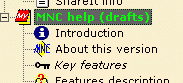
Then press Security options button in the Notebook properties panel. A Notebook security options dialog will appear.

Check the text after Current notebook status, it should be 'Not protected', if so - press Encrypt notebook button. You'll be asked for a password and a password reminder text. After a short time period the window will close and notebook encryption process finishes.
You can check the success of notebook protection in Notebook properties panel - after the Flags text a 'Encrypted' text should be. If so - notebook protection has been successfully completed.
|


 on-line help