|
My Notes Center |
| |||
 |
YOUR PERSONAL INFORMATION KEEPER |
|
|
To make a piece of text a hyperlink, select it in editor and choose Insert|Hyperlink... menu. Note, the ability to make any text a hyperlink, you must have at least MS Text Framework version 4.0 installed on your system. See how to update Microsoft text editing libraries. Choose the hyperlink type by clicking on the buttons of Link target toolbar. The apropriate page will be opened. The File, URL page allows to insert a link to file by choosing it in browser box (works like any open/save file dialog). Double-click on the file in the box to put the link into URL text field. Also you may enter any URL beginnig with http://, ftp://, etc. Make sure you have the text in Title text field than press OK to insert the hyperlink into editor (in caret position).
To delete the hyperlink, but keeping the title as plain text, press Delete hyperlink button.
|
|||||||||||||||||||
|
|
 
|
Copyright © BC software development, 1996-2007. Design by Vital Designs Studio. © MMI-MMVII. Powered by Parser3. All trademarks and registered trademarks are property of their respective owners. Legal notices. |


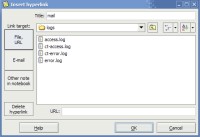 The Insert Hyperlink dialog allows you to insert or modify the link to any Internet resource, file on disk or network, e-mail with optional subject line or note in notebook.
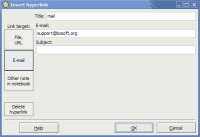 The E-mail page allows to insert the e-mail link. When clicking on it the default mail client will be opened.
 The Other note in notebook page allows to insert a link to any other note in current notebook or in notebook on disk. Note, the link will keep pointing to the note while it exists in the notebook. You may rename or move the target note as you wish inside target notebook.
 on-line help